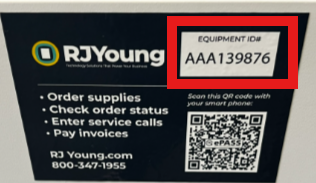
Your Equipment ID is printed on a sticker on the machine labeled "RJ Young." It's a unique identifier for your machine and usually begins with "AAA" or "EQU."
- Check the front of the machine. Look for the RJ Young sticker on the front panel.
- Check the top of the machine. If it isn't on the front, it's may be on top.
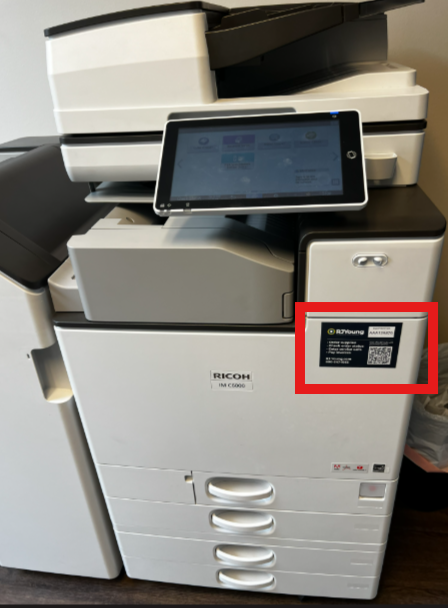
- Inspect the Top of the Machine: If the sticker is not visible on the front, check the top of the machine, as the Equipment ID is often placed there as well.
- Locate the Bar Code Sticker: The Equipment ID can be found on a bar code sticker that prominently features "RJ Young." This sticker includes a unique identifier for your machine, typically beginning with "AAA" or "EQU."
Can't find the Equipment ID? Use the serial number instead.
You can also use the serial number to request supplies or service. It's usually in one of these places:
- Back of the machine: on a label on the rear panel.
- Inside the front cover: open the front cover and look for a label.
- Side of the machine: some models have the label on a side panel.
If you can't find either number, contact our Customer Care team and we'll help you find it.
Call us: 800-347-1955
Hours: Monday–Friday, 7:00 a.m.–5:00 p.m. Central Time
Was this article helpful?
That’s Great!
Thank you for your feedback
Sorry! We couldn't be helpful
Thank you for your feedback
Feedback sent
We appreciate your effort and will try to fix the article